

- Create with AI (the campaign builder) uses your offer, proof and next step in the messages it writes.
- Write with AI in a step’s panel writes about what you really sell.
- Reply with AI (the reply box), Suggest reply in the inbox and the answers suggested for each reply type use your offer and avoid the words you listed.
- Ask AI (the step, the assistant you open from the top of every page and each campaign’s own assistant) knows what your business does.
Write it
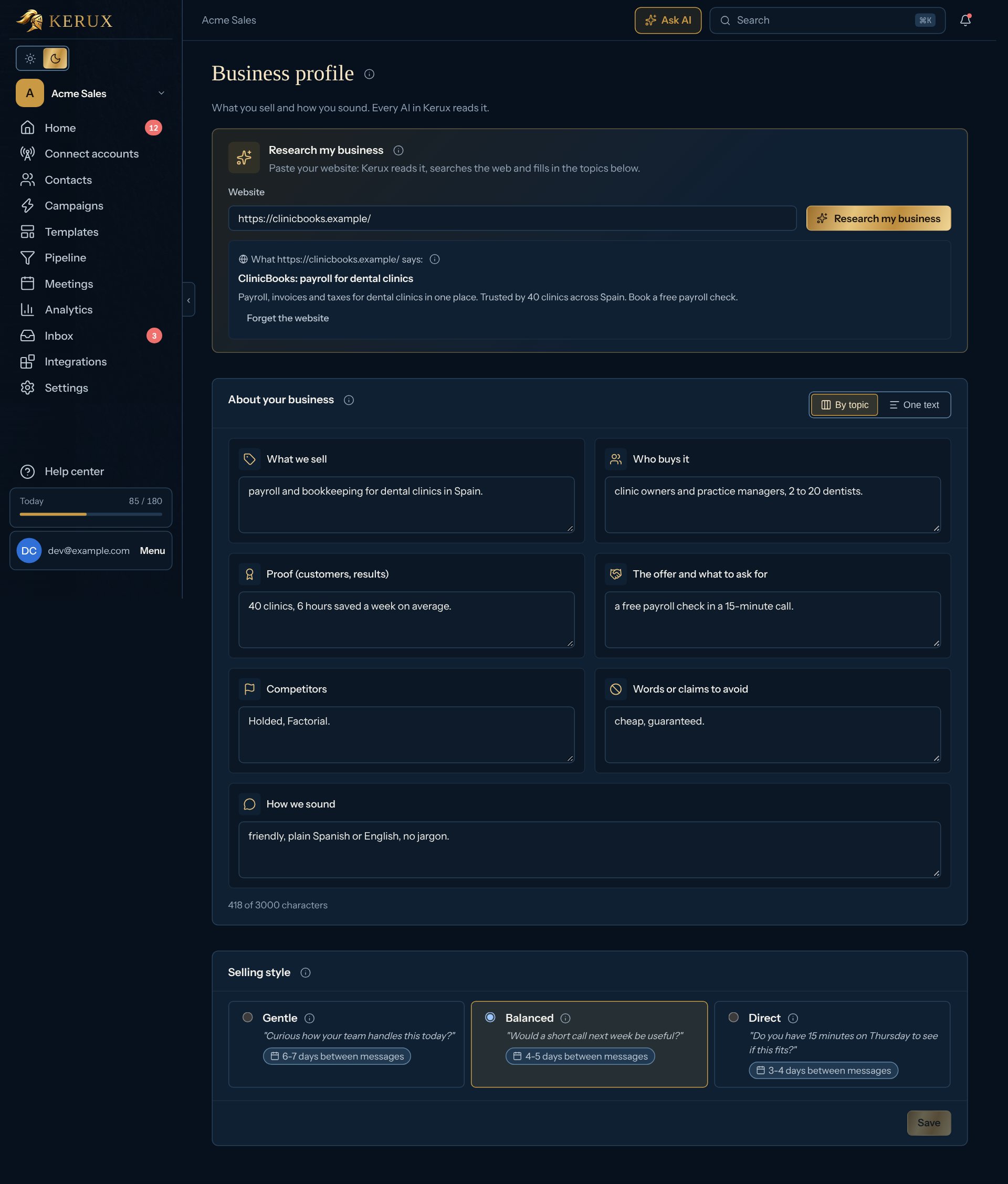
- Go to Settings > Business profile. Research my business is at the top: it can write the profile for you (see below).
- Under About your business, fill in the cards, one per topic: What we sell, Who buys it, Proof (customers, results), The offer and what to ask for, Competitors, Words or claims to avoid and How we sound. Each empty card shows an example. Up to 3,000 characters in all. To write freely, click One text to see and edit the whole profile as one text (on an empty profile, Start from the headings gives you a line for each part); By topic goes back to the cards. A text with parts outside the headings stays as one text.
- Pick a Selling style: three tiles, each with an example sentence and the days between messages.
- Click Save (it says Unsaved changes until you do).
Research my business (Pro)
- At the top of the page, under Research my business, write your website’s address in Website.
- Click Research my business.
- If your profile text is empty, it writes it with the headings (they show as the cards): what you sell, who buys it and their problem, proof (only what it finds), the offer and what to ask for, competitors (with their LinkedIn page when found) and words to avoid, and How we sound (only when it read posts that show how you write). Read it, change anything that’s wrong, and click Save. A text you wrote yourself is never changed.
- It shows Roles to reach and Competitors found, and saves them in your ideal customer (with industries, countries and company size) when those are still empty. Signals and the fit checks use them; change them there anytime.
Selling style
The style sets the tone of every AI that writes: Write with AI, Reply with AI, Ask AI and the assistants use it for their wording and for how early they suggest a call (Gentle asks questions first, Balanced suggests a short call softly, Direct asks for one clearly). For them it changes words only, never who gets a message, how many or when. When you Create with AI, the style also sets the campaign’s warm-up and timing. It never sends more messages and never goes above your LinkedIn accounts’ limits or warm-up.
With every style, a campaign built with AI sends at most 3 messages to a contact. When you create a campaign with AI you can pick another style for
that campaign under Selling style; the profile’s style is where it starts. If your description names exact
days (“follow up after 10 days”), the AI keeps them.
With the API
GET /v1/workspace/business-profile reads it (scope workflows:read) and PUT /v1/workspace/business-profile
changes the text and / or the style (gentle, balanced or direct; scope admin). See API.